

The best free AI image generator for most people is Google Gemini, because it gives you the most images per day at high resolution. ChatGPT is the pick when your prompt includes readable text, Leonardo AI suits you if you want style control, Canva fits you if the image goes straight into a design, and Perchance works when you do not want to sign up at all.
The problem is that every free tool hides a catch. One caps you at a few images a day, another lowers the resolution, and a third locks the useful features behind a paid plan. You can waste an hour on a generator only to hit a wall after your second image.
This list compares five free AI generation tools on what matters when you start: how many images you get, how good they look, and who each tool suits. Byteswift Digital covers free and private AI tools for everyday users, so the focus here is on what costs nothing. Free limits change often, so check each tool's own page before you plan a big batch.
1. Google Gemini
Gemini is the best free AI photo generator for volume. You type a prompt in the Gemini app or on the web, and it returns a finished image in seconds.
Free limits
- Daily allowance: recent tests put it near 100 images a day, far above its rivals.
- Resolution: up to 2048x2048.
- Sign-up: a Google account, which most Android users already have.
Google can change these caps at any time, so treat the numbers as a guide.
Quality and who it suits
Gemini handles realistic scenes well, including faces, lighting, and product-style shots. It also edits by conversation. Upload a photo, say "remove the background clutter" or "make it sunset," and it reworks the image. Images carry an invisible SynthID watermark, which does not change how they look.
Choose Gemini if you need many images, want realistic results, or work from your phone. Its weak spot is that it can ignore small details in very long prompts, so keep prompts focused and refine in follow-up messages.
If you only install one free image generator, make it Gemini, because its daily allowance is the largest.
2. ChatGPT
ChatGPT is the best free option when your image must follow a detailed prompt or include readable text. It trades volume for accuracy.
Free limits
- Daily allowance: roughly 2 to 3 images a day on the free tier.
- Sign-up: an OpenAI account is required.
- Editing: you refine images by chatting, in the same thread.
Here is what that means in practice. If you need 20 images for a slide deck, ChatGPT takes about 7 to 10 days. Gemini finishes the job in one sitting.
Quality and who it suits
ChatGPT follows long, specific instructions better than most free tools. Posters, signs, menus, and logos with legible lettering come out cleaner here than in many rivals. If you wonder which free AI beats ChatGPT, the answer depends on the job. Gemini wins on quantity, and Leonardo wins on style control.
Pick ChatGPT for a few high-value images where wording and layout matter. Skip it if you want to experiment freely, because the daily cap will stop you.
ChatGPT gives you fewer images but follows your prompt more closely, especially when text is involved.
3. Leonardo AI
Leonardo AI is the best free choice if you want to steer the look of your images. It works more like a creative studio than a chat box.
Free limits
- Daily allowance: a pool of credits that refills each day, so the number of images depends on the settings you pick.
- Sign-up: an account is required.
- Privacy: check whether free-plan images are public before you upload anything personal.
Higher resolutions and extra options use more credits. Pick modest settings to stretch your allowance.
Quality and who it suits
Leonardo offers several image models, style presets, and an editing canvas. You can also start from a reference picture, which answers the common search for an AI image generator that works from an image. Results range from photoreal to anime to fantasy art, and the style presets save you from writing long prompts.
It suits hobbyists, game designers, and anyone who wants a consistent look across many images. Beginners may find the interface busier than Gemini's, and paid features are marked throughout the app.
Leonardo rewards you for learning its settings, which makes it the best free pick for consistent style.
4. Canva AI image generator
Canva is the best free generator when the image is only a piece of a bigger design. You create the picture and drop it straight into a post, slide, or flyer.
Free limits
- Daily allowance: free accounts get a limited number of generations, and Pro raises that limit.
- Controls: you pick a style and aspect ratio before you generate.
- Sign-up: a free Canva account is needed, and the mobile apps work on Android and iOS.
Quality and who it suits
The images lean toward clean illustrations, graphics, and stylized scenes rather than convincing photographs. That is fine for social posts, thumbnails, and school projects. The real advantage is what happens next. You resize the image, add text, apply a template, and export, all without leaving the app.
Students, small business owners, and casual creators get the most from it. If you need photorealism or a large batch of images, Gemini does that job better and Canva fills the design step afterward.
Canva is not the strongest generator, but it is the fastest route from a prompt to a finished post.
5. Perchance
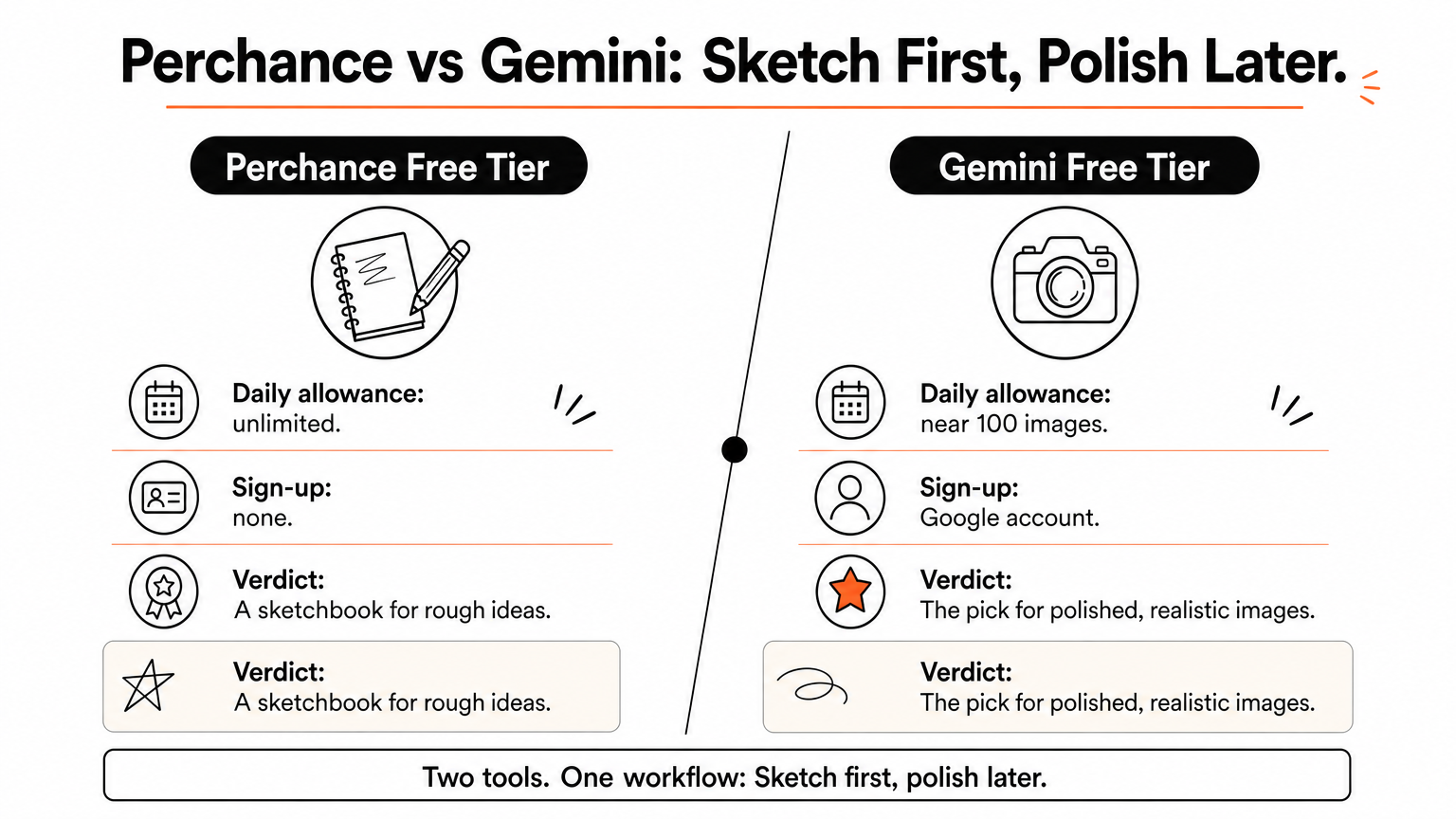
Perchance is the answer when you ask which AI has unlimited image generation for free. It has no daily cap, and you do not need an account.
Free limits
- Daily allowance: unlimited.
- Resolution: about 512x768, which is low.
- Sign-up: none, so it also suits shared computers.
Use the official perchance.org site. Lookalike pages exist, and they are not worth your clicks.
Quality and who it suits
Expect softer detail and more odd hands and faces than from the tools above. The upside is speed and freedom. You can run dozens of prompts, test wording, and find a direction without worrying about a counter ticking down.
Perchance suits brainstorming, rough concept art, and anyone who refuses to create accounts. A smart workflow is to explore ideas here, then move your best prompt to Gemini or ChatGPT for a sharper final image.
Perchance trades image quality for freedom, which makes it a sketchbook rather than a finishing tool.
Which one should you pick?
Start with Gemini. It gives you the most images, the highest resolution, and photo-like results at no cost. Move to ChatGPT when your image needs accurate text, to Leonardo AI when you want control over style, and to Canva when the picture belongs inside a design. Keep Perchance for unlimited experiments with no sign-up.
You can also combine them. Draft ideas on Perchance, generate polished versions in Gemini, and finish the layout in Canva. Since free limits shift, test each tool with one real prompt before you commit to a project.
If you want more walkthroughs on free AI tools, Windows fixes, and private setups, browse the latest guides on Byteswift Digital.
